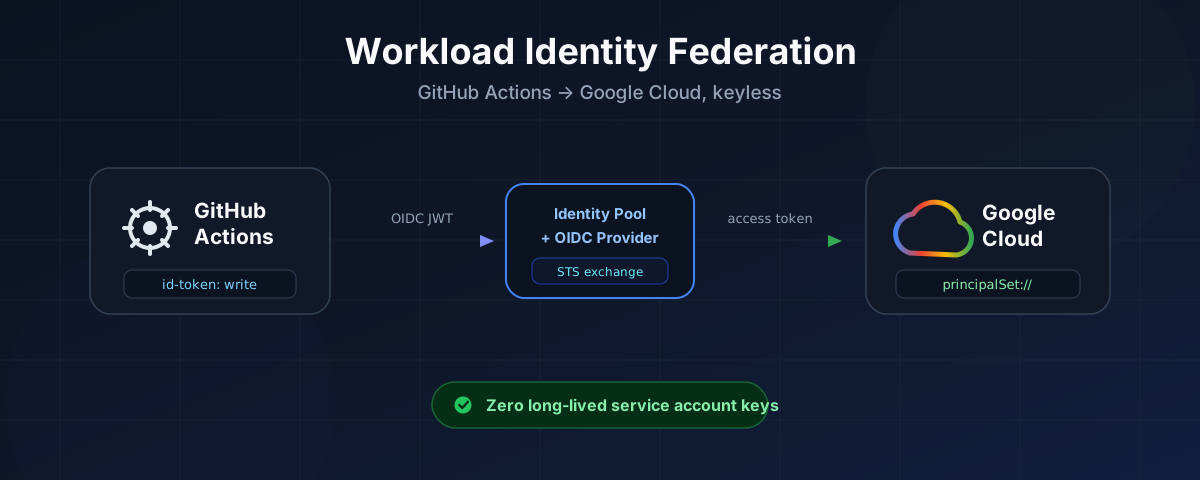
Every few months I get pulled into the same review conversation. A team has a GitHub Actions pipeline deploying to Google Cloud, and somewhere in the repo settings there is a secret called GCP_SA_KEY holding a service account JSON key. It works. It has worked for two years. Nobody wants to touch it.
That key is a permanent, exportable credential. It does not expire. It does not know which repository it came from, which branch triggered the run, or who approved the deploy. If it leaks — in a build log, a container layer, a fork, a compromised action — whoever holds it is your service account until a human notices and rotates it.
Workload Identity Federation removes the key entirely. Your workflow proves who it is with a short-lived token that GitHub itself signs, Google verifies that token against rules you define, and your job gets credentials that expire in minutes. Nothing is stored in GitHub secrets. Nothing to rotate. Nothing to leak.
This post is the full walkthrough I wish existed when I set this up the first time: the architecture, both the gcloud and Console paths, the GitHub org and repo settings that trip people up, the IAM binding syntax, complete working workflows, and the errors you will actually hit.
One thing before we start, because it will bite you if you skip it: on 15 July 2026 GitHub changed the default OIDC subject claim format. If you are setting this up fresh in 2026, this changes what your trust rules should match on. I cover it in detail in the GitHub-side section, and it is the reason this guide steers you toward attribute-based rules rather than subject-based ones.
1. The mental model
Strip away the terminology and there are only three moving parts.
GitHub can vouch for your job. Every workflow job can ask GitHub for a signed JSON Web Token that describes it — which repository, which branch, which environment, which workflow file, which actor. GitHub signs it with a private key and publishes the matching public key at a well-known URL. Anyone can verify the signature; nobody can forge one.
Google can be taught to trust that voucher. A Workload Identity Pool with an OIDC Provider inside it is the configuration that says: “I trust tokens issued by token.actions.githubusercontent.com, but only if they satisfy these conditions, and here is how to translate their claims into something IAM understands.”
IAM grants roles to the translated identity. Once Google accepts the token, your job is a first-class IAM principal with a name like principalSet://.../attribute.repository/acme-corp/infra-deploy. You grant roles to that string exactly as you would to a user or a service account.
That is the whole idea. Everything below is detail.
Read that diagram left to right. GitHub mints a token describing the job. The pool’s provider validates it and turns it into a Google principal. IAM then either lets that principal touch resources directly (Path A), or lets it borrow a service account that has the permissions (Path B).
The exchange, step by step
The architecture tells you what exists. This tells you what happens when the job runs:
Two details in there matter more than they look:
- The audience must match. GitHub’s OIDC token has a default
audof your repository owner’s URL. Google expects theaudto be your provider’s full resource name. Thegoogle-github-actions/authaction reconciles this automatically by requesting the token withaudienceset to yourworkload_identity_providervalue. This only becomes your problem if you mint the token by hand withcurl— then you must append&audience=<provider resource name>yourself. - Everything is short-lived. The GitHub OIDC token expires in about five minutes. A Direct WIF token inherits that lifetime and caps out at ten minutes. A service account access token defaults to one hour. All of them die with the job.
2. Direct WIF or service account impersonation?
There are two ways to finish the flow, and picking the wrong one is the most common early mistake. Google and the auth action both recommend Direct WIF, but it genuinely cannot do everything.
| Path A — Direct WIF | Path B — Impersonate a service account | |
|---|---|---|
| Service account needed | No | Yes |
| Where you grant roles | To the principalSet://… string | To the service account |
| Extra role needed | None | roles/iam.workloadIdentityUser on the SA |
| Token lifetime | Max 10 minutes | Default 1 hour |
| Can produce an OAuth access token | No | Yes (token_format: 'access_token') |
| Can produce an ID token | No | Yes (token_format: 'id_token') |
| Works with every Google API | No — see below | Yes |
| Blast radius | Scoped to the repo/branch attribute | Whatever the SA can do |
Use Direct WIF when you are running gcloud, terraform, kubectl via get-gke-credentials, reading Secret Manager, or pushing to Artifact Registry. These all work fine with a federated identity, and you never create a service account at all.
Fall back to impersonation when you hit one of the real limitations:
- Cloud Run does not support Direct WIF at all. Google’s own documentation states it twice: “Cloud Run doesn’t support Workload Identity Federation direct resource access. To allow access, use service account impersonation.” If your pipeline runs
gcloud run deployor usesdeploy-cloudrun, you need Path B. This is by far the most-hit blocker. - You need an OAuth access token or ID token as a step output — for
docker/login-actionwithaccess_token, for calling a private Cloud Run service, or for anything wanting a bearer token for a specific identity. - Cloud Storage with fine-grained ACLs. Federation only works against uniform bucket-level access buckets, and federated identities cannot generate signed URLs.
- App Engine, Cloud Source Repositories, Deployment Manager, Container Registry, Cloud Shell and a handful of others do not support federation in any form. Google maintains the full compatibility table — check it before you commit to a design.
My practical advice: start with Direct WIF. Add a service account only for the specific jobs that need it, and give that service account only the roles those jobs need. Nothing stops you running both patterns off the same pool.
3. Prerequisites
On the Google Cloud side you need a project and enough IAM to create pools and edit policies — roles/iam.workloadIdentityPoolAdmin and roles/resourcemanager.projectIamAdmin, or just roles/owner in a sandbox.
On the GitHub side you need admin on the repository, and admin on the organization if you plan to touch org-level Actions policy.
Locally, a recent gcloud. Check with gcloud version — for anything WIF-related you want a reasonably current SDK, and note that setup-gcloud in the workflow requires at least 363.0.0 for federated auth (and 390.0.0 if you use bq).
One note on documentation links: Google moved their IAM docs to docs.cloud.google.com — the old cloud.google.com/iam/docs/* URLs still work but now 301-redirect. All links here use the new host.
4. Setting it up with the gcloud CLI
This is the path I use for anything real, because it is reproducible and drops straight into Terraform later. The Console walkthrough is in section 6 if you prefer clicking.
4.1 Set your variables
Everything below reads from these. Fill them in once.
# --- Google Cloud ---
export PROJECT_ID="mevijay-demo"
export POOL_ID="github-pool"
export PROVIDER_ID="github-provider"

# --- GitHub ---
export GITHUB_ORG="acme-corp"
export GITHUB_REPO="acme-corp/infra-deploy"   # full owner/repo

# Derived — do not hand-edit
export PROJECT_NUMBER="$(gcloud projects describe "${PROJECT_ID}" --format='value(projectNumber)')"

echo "Project number: ${PROJECT_NUMBER}"
The project number is not the project ID. Every principal identifier and every audience string uses the number. Pasting the ID instead produces an IAM binding that saves cleanly, looks correct in the Console, and never matches a single token. If you take one thing from this post, take that.
Now grab GitHub’s immutable numeric IDs — you will pin your trust rules to these rather than to names:
# For an organization
export GITHUB_ORG_ID="$(gh api "/orgs/${GITHUB_ORG}" --jq .id)"

# For a personal account, use /users/ instead
# export GITHUB_ORG_ID="$(gh api "/users/${GITHUB_ORG}" --jq .id)"

export GITHUB_REPO_ID="$(gh api "/repos/${GITHUB_REPO}" --jq .id)"

echo "Org ID: ${GITHUB_ORG_ID}  Repo ID: ${GITHUB_REPO_ID}"
No gh CLI? The public API works unauthenticated for public resources:
curl -sfL -H "Accept: application/json" "https://api.github.com/orgs/acme-corp" | jq .id
curl -sfL -H "Accept: application/json" "https://api.github.com/repos/acme-corp/infra-deploy" | jq .id
4.2 Enable the APIs
Four APIs. sts performs the exchange, iamcredentials performs impersonation, iam holds the pool, cloudresourcemanager is needed for project-level policy edits.
gcloud services enable \
  iam.googleapis.com \
  cloudresourcemanager.googleapis.com \
  iamcredentials.googleapis.com \
  sts.googleapis.com \
  --project="${PROJECT_ID}"
4.3 Create the Workload Identity Pool
gcloud iam workload-identity-pools create "${POOL_ID}" \
  --project="${PROJECT_ID}" \
  --location="global" \
  --display-name="GitHub Actions Pool" \
  --description="Federated identities for GitHub Actions workflows"
Constraints worth knowing before you type a name you cannot change:
- Pool and provider IDs are 4–32 characters,
[a-z0-9-]only. - The prefix
gcp-is reserved and rejected. - Both IDs are immutable after creation.
--locationis alwaysglobaltoday.- Deleting a pool tombstones its ID for 30 days. You cannot recreate
github-poolwith the same name until that window passes. Prefer--disabledover deletion while experimenting.
4.4 Create the OIDC provider
This is the important command. Read it before running it.
gcloud iam workload-identity-pools providers create-oidc "${PROVIDER_ID}" \
  --project="${PROJECT_ID}" \
  --location="global" \
  --workload-identity-pool="${POOL_ID}" \
  --display-name="GitHub Actions Provider" \
  --description="OIDC provider trusting GitHub Actions tokens" \
  --issuer-uri="https://token.actions.githubusercontent.com" \
  --attribute-mapping="google.subject=assertion.sub,attribute.actor=assertion.actor,attribute.repository=assertion.repository,attribute.repository_id=assertion.repository_id,attribute.repository_owner=assertion.repository_owner,attribute.repository_owner_id=assertion.repository_owner_id,attribute.ref=assertion.ref,attribute.environment=assertion.environment,attribute.workflow_ref=assertion.workflow_ref,attribute.job_workflow_ref=assertion.job_workflow_ref,attribute.runner_environment=assertion.runner_environment" \
  --attribute-condition="assertion.repository_owner_id == '${GITHUB_ORG_ID}'"
Three flags carry all the weight here.
--issuer-uri is GitHub’s OIDC issuer. Google’s docs write it with a trailing slash (…githubusercontent.com/), the auth action’s README writes it without. Both are accepted — but pick one and be consistent, because following two guides at once is how people end up with a mismatch.
--attribute-mapping translates GitHub’s claims into Google’s attribute namespace. The left side is what Google will know the value as; the right side is a CEL expression over the incoming token. google.subject is mandatory. Every attribute.* you might ever want to use in an IAM binding or a condition must be mapped here first — you cannot reference an unmapped claim, and adding one later means updating the provider. The mapping above is deliberately generous for that reason. Limits: 50 custom attributes, and google.subject must stay under 127 bytes.
--attribute-condition is the gate. It is a CEL expression evaluated against the raw token, and any token that does not satisfy it is rejected before it ever becomes a Google identity. Do not skip this. Without a condition, your pool will accept a valid GitHub OIDC token from any repository on GitHub — every public repo, every fork, every account. The IAM binding is your second line of defence, not your first. The auth action’s own docs put it bluntly: “Always add an Attribute Condition to restrict entry into the Workload Identity Pool.”
Note I pinned on repository_owner_id, not repository_owner. Google is explicit about why: “Using ‘name’ fields like repository and repository_owner increases the chances of cybersquatting and typosquatting attacks. If you delete your GitHub repository or GitHub organization, someone may be able to claim that same name and establish an identity.” Numeric IDs are unique and never reused. They are also strings in the JWT, so quote them in CEL — comparing against an unquoted integer silently fails.
4.5 Capture the provider resource name
This exact string goes into your workflow:
gcloud iam workload-identity-pools providers describe "${PROVIDER_ID}" \
  --project="${PROJECT_ID}" \
  --location="global" \
  --workload-identity-pool="${POOL_ID}" \
  --format="value(name)"
projects/123456789012/locations/global/workloadIdentityPools/github-pool/providers/github-provider
And the pool name, which you need to build principalSet:// strings:
export WIF_POOL_NAME="$(gcloud iam workload-identity-pools describe "${POOL_ID}" \
  --project="${PROJECT_ID}" --location="global" --format='value(name)')"

echo "${WIF_POOL_NAME}"
# projects/123456789012/locations/global/workloadIdentityPools/github-pool
4.6 Path A — grant roles directly (no service account)
Now you bind the federated identity to real permissions. The member string follows this grammar:
principal://iam.googleapis.com/POOL_NAME/subject/SUBJECT
principalSet://iam.googleapis.com/POOL_NAME/group/GROUP
principalSet://iam.googleapis.com/POOL_NAME/attribute.ATTRIBUTE_NAME/ATTRIBUTE_VALUE
principalSet://iam.googleapis.com/POOL_NAME/*
The attribute form is the one you want. Grant a role scoped to one repository:
gcloud projects add-iam-policy-binding "${PROJECT_ID}" \
  --role="roles/artifactregistry.writer" \
  --member="principalSet://iam.googleapis.com/${WIF_POOL_NAME}/attribute.repository/${GITHUB_REPO}"
Or scope it to an individual resource, which is much better practice:
# One secret
gcloud secrets add-iam-policy-binding "deploy-config" \
  --project="${PROJECT_ID}" \
  --role="roles/secretmanager.secretAccessor" \
  --member="principalSet://iam.googleapis.com/${WIF_POOL_NAME}/attribute.repository/${GITHUB_REPO}"

# One bucket (must be uniform bucket-level access)
gcloud storage buckets add-iam-policy-binding "gs://acme-tfstate" \
  --role="roles/storage.objectAdmin" \
  --member="principalSet://iam.googleapis.com/${WIF_POOL_NAME}/attribute.repository/${GITHUB_REPO}"
You are not limited to repository. Any attribute you mapped in the provider can carry a binding — which is how you scope a role to production deploys only:
gcloud projects add-iam-policy-binding "${PROJECT_ID}" \
  --role="roles/container.developer" \
  --member="principalSet://iam.googleapis.com/${WIF_POOL_NAME}/attribute.environment/production"
Now only jobs that declare environment: production can exercise that role — and, if you have put protection rules on that environment, only after a human has approved the run.
Never use the /* form unless you have thought very hard about it. principalSet://iam.googleapis.com/${WIF_POOL_NAME}/* grants the role to every identity the pool will ever accept. Google warns against it, and the auth action’s docs are blunter: “Never use a ‘*’ in an IAM Binding unless you absolutely know what you are doing!”
That is it for Path A. No service account exists. Skip to section 7 unless you need impersonation.
4.7 Path B — create a service account to impersonate
Create it and give it the roles your pipeline needs:
export SA_NAME="gh-deployer"
export SA_EMAIL="${SA_NAME}@${PROJECT_ID}.iam.gserviceaccount.com"

gcloud iam service-accounts create "${SA_NAME}" \
  --project="${PROJECT_ID}" \
  --display-name="GitHub Actions deployer"

gcloud projects add-iam-policy-binding "${PROJECT_ID}" \
  --member="serviceAccount:${SA_EMAIL}" \
  --role="roles/run.admin"

gcloud projects add-iam-policy-binding "${PROJECT_ID}" \
  --member="serviceAccount:${SA_EMAIL}" \
  --role="roles/artifactregistry.writer"
Now the binding that makes federation work — this is the one people forget:
gcloud iam service-accounts add-iam-policy-binding "${SA_EMAIL}" \
  --project="${PROJECT_ID}" \
  --role="roles/iam.workloadIdentityUser" \
  --member="principalSet://iam.googleapis.com/${WIF_POOL_NAME}/attribute.repository/${GITHUB_REPO}"
Read that carefully: the role is granted on the service account, to the federated principal. It says “this GitHub repository is allowed to borrow this identity”. Without it you get a permission-denied on generateAccessToken that looks like a missing project role but is not.
Deploying to Cloud Run additionally needs the deployer to act as the runtime service account:
gcloud iam service-accounts add-iam-policy-binding \
  "${PROJECT_NUMBER}-compute@developer.gserviceaccount.com" \
  --project="${PROJECT_ID}" \
  --role="roles/iam.serviceAccountUser" \
  --member="serviceAccount:${SA_EMAIL}"
4.8 Full script
Everything above in one block, for copy-paste:
#!/usr/bin/env bash
set -euo pipefail

PROJECT_ID="mevijay-demo"
POOL_ID="github-pool"
PROVIDER_ID="github-provider"
GITHUB_ORG="acme-corp"
GITHUB_REPO="acme-corp/infra-deploy"

PROJECT_NUMBER="$(gcloud projects describe "${PROJECT_ID}" --format='value(projectNumber)')"
GITHUB_ORG_ID="$(gh api "/orgs/${GITHUB_ORG}" --jq .id)"

gcloud services enable \
  iam.googleapis.com cloudresourcemanager.googleapis.com \
  iamcredentials.googleapis.com sts.googleapis.com \
  --project="${PROJECT_ID}"

gcloud iam workload-identity-pools create "${POOL_ID}" \
  --project="${PROJECT_ID}" --location="global" \
  --display-name="GitHub Actions Pool"

gcloud iam workload-identity-pools providers create-oidc "${PROVIDER_ID}" \
  --project="${PROJECT_ID}" --location="global" \
  --workload-identity-pool="${POOL_ID}" \
  --display-name="GitHub Actions Provider" \
  --issuer-uri="https://token.actions.githubusercontent.com" \
  --attribute-mapping="google.subject=assertion.sub,attribute.actor=assertion.actor,attribute.repository=assertion.repository,attribute.repository_id=assertion.repository_id,attribute.repository_owner=assertion.repository_owner,attribute.repository_owner_id=assertion.repository_owner_id,attribute.ref=assertion.ref,attribute.environment=assertion.environment,attribute.workflow_ref=assertion.workflow_ref,attribute.job_workflow_ref=assertion.job_workflow_ref,attribute.runner_environment=assertion.runner_environment" \
  --attribute-condition="assertion.repository_owner_id == '${GITHUB_ORG_ID}'"

WIF_POOL_NAME="projects/${PROJECT_NUMBER}/locations/global/workloadIdentityPools/${POOL_ID}"

# Path A — direct binding
gcloud projects add-iam-policy-binding "${PROJECT_ID}" \
  --role="roles/artifactregistry.writer" \
  --member="principalSet://iam.googleapis.com/${WIF_POOL_NAME}/attribute.repository/${GITHUB_REPO}"

echo
echo "workload_identity_provider:"
echo "  ${WIF_POOL_NAME}/providers/${PROVIDER_ID}"
5. What to change on the GitHub side
This is the section most guides skip entirely, and then people wonder why a correct GCP setup still fails.
5.1 The workflow permissions block (mandatory)
Without this, nothing works:
permissions:
  contents: 'read'
  id-token: 'write'
id-token: write is what causes the runner to inject ACTIONS_ID_TOKEN_REQUEST_URL and ACTIONS_ID_TOKEN_REQUEST_TOKEN into the job. It is never granted by default. Miss it and the action fails with:
GitHub Actions did not inject $ACTIONS_ID_TOKEN_REQUEST_TOKEN or
$ACTIONS_ID_TOKEN_REQUEST_URL into this job. This most likely means the
GitHub Actions workflow permissions are incorrect, or this job is being
run from a fork.
And you must list contents: read explicitly alongside it. The moment you declare any permissions key, every permission you did not name drops to none. That is why contents: read appears in every example — without it your actions/checkout breaks.
You can put the block at workflow level or job level. Job level is what all the Google actions use in their docs, and it is the better habit — only the job that needs to authenticate gets the capability.
5.2 Actions policy — org and repo
Settings → Actions → General → Actions permissions.
If your org runs the default “Allow all actions”, nothing to do. If you run “Allow select actions” — common in regulated environments — you must allowlist what the workflow uses:
google-github-actions/*,
actions/checkout@*,
docker/login-action@*,
docker/build-push-action@*
Patterns support wildcards, comma separation, and ! negation. Org-level restrictions cascade down and lock the equivalent repo-level setting, so if your workflow fails at the action resolution step rather than the auth step, look here first.
The “Workflow permissions” radio on the same page (read vs read-write GITHUB_TOKEN) governs contents/packages. It does not control id-token — that is only ever granted by an explicit permissions: block. Setting it to “read repository contents” is fine and does not break WIF.
5.3 Environments — where the real gating happens
Settings → Environments → New environment.
An environment does two things for you at once. It adds environment to the OIDC token’s claims, which lets you write a GCP condition that only production deploys can satisfy. And it lets you attach protection rules — required reviewers, wait timers, and deployment branch policies.
That pairing is the point. A condition of assertion.environment == 'production' is only as trustworthy as the rules on the environment. Add required reviewers and restrict the deployment branches to main, and now your GCP production role genuinely cannot be exercised without a human approving a run on main.
5.4 The July 2026 subject claim change
This is the one to read twice.
Historically the sub claim looked like:
repo:acme-corp/infra-deploy:ref:refs/heads/main
Names only. Which meant that if you deleted your org and someone re-registered the name, they could mint tokens with an identical sub — and any cloud trust policy matching that string would accept them.
GitHub fixed this. Per their documentation: “repositories created after July 15, 2026 now use an immutable default subject format that includes both the owner ID and repository ID.”
repo:acme-corp@99887766/infra-deploy@20300177:ref:refs/heads/main
The @ separator was chosen because it cannot appear in a GitHub username or repository name. What you need to know:
- Repositories created after 15 July 2026 get the new format automatically.
- Repositories renamed or transferred after that date also move to it.
- Repositories created before then keep the old format unless you opt in, via the OIDC settings UI or the REST API.
- Not applicable to GitHub Enterprise Server.
- Even with a customised subject, the owner and repo IDs are always present in the
reposegment — you cannot strip them.
What this breaks: any IAM binding of the form principal://.../subject/repo:acme-corp/infra-deploy:ref:refs/heads/main, and any attribute mapping that slices assertion.sub. These stop matching silently — the job just starts getting permission denied.
What this does not break: conditions and bindings on assertion.repository, assertion.repository_id, assertion.repository_owner_id, assertion.ref and friends. Those claims are unchanged.
That is precisely why every example in this post binds on attribute.repository rather than subject. If you follow the setup above, this change is a non-event for you. If you have an older setup using subject-based bindings, migrate now rather than on the day someone renames a repo.
5.5 Customising the subject claim (optional)
If you do want a custom subject — say to pin on the reusable workflow file rather than the branch — the REST API is:
# Repository level
gh api --method PUT /repos/acme-corp/infra-deploy/actions/oidc/customization/sub \
  --input - <<'JSON'
{
  "use_default": false,
  "include_claim_keys": ["repo", "job_workflow_ref"]
}
JSON
# Revert to GitHub's default
gh api --method PUT /repos/acme-corp/infra-deploy/actions/oidc/customization/sub \
  --input - <<'JSON'
{ "use_default": true }
JSON
There is an org-level equivalent at /orgs/{org}/actions/oidc/customization/sub that sets a template for all repositories; individual repos opt out with use_default: true.
The use_default flag reads backwards from what people expect, so be careful: true means “ignore any customisation, use GitHub’s standard format”.
Order matters. Create the matching condition on the Google Cloud side before you change the subject format, otherwise every token in flight gets rejected.
5.6 Inspecting the token yourself
When something does not add up, look at the actual token instead of guessing. Drop this into a scratch workflow:
name: 'Debug OIDC token'
on:
  workflow_dispatch:

jobs:
  debug:
    runs-on: 'ubuntu-latest'
    permissions:
      contents: 'read'
      id-token: 'write'
    steps:
      - name: 'Decode the OIDC token claims'
        run: |-
          TOKEN="$(curl -sSf \
            -H "Authorization: bearer ${ACTIONS_ID_TOKEN_REQUEST_TOKEN}" \
            "${ACTIONS_ID_TOKEN_REQUEST_URL}&audience=https://github.com/acme-corp" \
            | jq -r '.value')"

          echo "${TOKEN}" | cut -d. -f2 | base64 -d 2>/dev/null | jq .
That prints every claim in the token — sub, repository, repository_owner_id, ref, environment, job_workflow_ref, runner_environment, the lot. Compare what you see against your attribute condition and the mismatch is usually obvious in seconds. Remove the workflow when you are done; there is no reason to leave a token-printer in a repo.
6. The same thing in the Cloud Console
If you prefer the UI, here is the identical setup. Button casing shifts between Google’s own pages, so match on the field’s purpose rather than exact capitalisation.
Creating the pool and provider
- Go to IAM & Admin → Workload Identity Federation, or straight to console.cloud.google.com/iam-admin/workload-identity-pools. Confirm the project selector shows the right project.
- Click Create pool. The current wizard creates the pool and its first provider in one flow.
- Step 1 — “Create an identity pool”
- Name —
github-pool. This also becomes the pool ID, and the ID cannot be changed later. A typo here is permanent. - Description — optional.
- Continue.
- Name —
- Step 2 — “Add a provider to pool”
- Select a provider → OpenID Connect (OIDC).
- Provider name →
github-provider(again, this becomes an immutable Provider ID). - Issuer (URL) →
https://token.actions.githubusercontent.com/ - JWK file (JSON) → leave empty. GitHub publishes a discoverable JWKS; this field is only for IdPs Google cannot reach.
- Audiences → choose Default audience.
- Continue.
On that audience choice: “Default audience” does not store a literal value. It means the allowed-audiences list is empty, which makes Google require the token’s
audto equal the provider’s own full resource name. That is exactly whatgoogle-github-actions/authsends by default, and it is what protects you from a confused-deputy attack. If you ever add even one entry under “Allowed audiences”, the default form stops being accepted and existing workflows break — the list is exclusive, not additive. -
Step 3 — “Configure provider attributes”
Add one row per mapping. The left cell is the Google-side name, the right cell is a CEL expression over the incoming token:
Google side OIDC side google.subjectassertion.subattribute.actorassertion.actorattribute.repositoryassertion.repositoryattribute.repository_idassertion.repository_idattribute.repository_ownerassertion.repository_ownerattribute.repository_owner_idassertion.repository_owner_idattribute.refassertion.refattribute.environmentassertion.environmentattribute.job_workflow_refassertion.job_workflow_refattribute.runner_environmentassertion.runner_environment -
In the Attribute conditions box on the same step, enter your CEL gate:
assertion.repository_owner_id == '99887766' - Save.
Granting access — Path A (Direct WIF)
- Go to IAM & Admin → IAM → Grant access.
-
In New principals, paste the full principal string:
principalSet://iam.googleapis.com/projects/123456789012/locations/global/workloadIdentityPools/github-pool/attribute.repository/acme-corp/infra-deployThe autocomplete will not help you here — it only suggests Google identities (users, groups, service accounts). The field will look unhappy until the full, syntactically valid URI is entered. That is normal. What is not normal is using the project ID instead of the project number, which is the single most common failure in this entire flow.
- Pick the role under Select a role, then Save.
The same “Grant access → New principals” pattern works on an individual resource’s Permissions tab — a bucket, a secret, an Artifact Registry repository — which is where you should prefer to grant.
Granting access — Path B (impersonation)
- Open your pool from the Workload Identity Federation page.
- Click Grant access.
- Choose Grant access using Service Account impersonation.
- Pick the service account under Service accounts.
- Under principals, choose Only identities matching the filter — not “All identities in the pool”.
- Set Attribute name to
repositoryand Attribute value toacme-corp/infra-deploy. - Save.
That produces exactly the roles/iam.workloadIdentityUser binding from section 4.7.
One thing to skip: the Download config / “Configure your application” dialog. It generates an external-account credentials JSON for workloads that read a token from a file or URL — Kubernetes, on-prem, self-hosted tooling. google-github-actions/auth writes its own credentials file at runtime, so for GitHub Actions this dialog is a dead end. Guides that tell you to download it are leading you somewhere you do not need to go.
Managing pools afterwards
Click the pool display name to edit its description. The Status toggle disables and re-enables a pool or provider — always prefer this over deleting while you are still testing, because deletion tombstones the ID for 30 days. Deleted resources are hidden until you flip Show deleted pools and providers, after which a Restore icon appears (within the 30-day window).
7. The workflows
Current action versions as of August 2026 — worth stating, because much of Google’s own documentation is several majors behind (their deployment-pipelines page still shows auth@v1):
| Action | Tag |
|---|---|
google-github-actions/auth | v3 (v3.0.0) |
google-github-actions/setup-gcloud | v3 (v3.0.1) |
google-github-actions/deploy-cloudrun | v3 (v3.0.1) |
google-github-actions/get-gke-credentials | v3 (v3.0.0) |
actions/checkout | v7 (v7.0.1) |
docker/login-action | v4 (v4.6.0) |
auth@v3 runs on Node 24 and dropped the long-deprecated retries, backoff and backoff_limit inputs. If you are on v2 those were already no-ops, so the upgrade is a version bump and nothing else.
7.1 Direct WIF — prove it works
Start here. This is the smallest workflow that demonstrates a real federated identity, and it is what I run first on any new setup.
name: 'Verify Workload Identity Federation'

on:
  workflow_dispatch:
  push:
    branches: ['main']

jobs:
  verify:
    name: 'Authenticate and prove identity'
    runs-on: 'ubuntu-latest'

    permissions:
      contents: 'read'
      id-token: 'write'

    steps:
      - name: 'Checkout'
        uses: 'actions/checkout@v7'

      - id: 'auth'
        name: 'Authenticate to Google Cloud'
        uses: 'google-github-actions/auth@v3'
        with:
          project_id: 'mevijay-demo'
          workload_identity_provider: 'projects/123456789012/locations/global/workloadIdentityPools/github-pool/providers/github-provider'

      - name: 'Set up Cloud SDK'
        uses: 'google-github-actions/setup-gcloud@v3'
        with:
          version: '>= 363.0.0'

      - name: 'Who am I?'
        run: |-
          gcloud auth list
          gcloud config list project
          gcloud storage ls
No service_account input, so this is Direct WIF. gcloud auth list will print the federated principal — that is your proof the exchange worked and IAM sees the identity you expect.
Two ordering rules that are easy to get wrong:
actions/checkoutmust come beforeauth. The action writes its credentials file into$GITHUB_WORKSPACE, and checkout clears that directory. Put checkout after and later steps mysteriously fail to authenticate.- Add
gha-creds-*.jsonto your.gitignoreand.dockerignore. It is a short-lived credential, but there is no reason for it to end up in a container layer or a build artifact. If you useget-gke-credentials, addgha-kubeconfig-*too.
7.2 Impersonation — build, push, and deploy to Cloud Run
This is the realistic pipeline: build a container, push it to Artifact Registry, deploy to Cloud Run, gated behind a GitHub environment. It uses impersonation because Cloud Run requires it and because docker/login-action needs a real OAuth access token.
name: 'Build and deploy to Cloud Run'

on:
  push:
    branches: ['main']

env:
  PROJECT_ID: 'mevijay-demo'
  REGION: 'asia-south1'
  SERVICE: 'orders-api'
  AR_REPO: 'containers'
  WIF_PROVIDER: 'projects/123456789012/locations/global/workloadIdentityPools/github-pool/providers/github-provider'
  SERVICE_ACCOUNT: 'gh-deployer@mevijay-demo.iam.gserviceaccount.com'

jobs:
  deploy:
    name: 'Build, push and deploy'
    runs-on: 'ubuntu-latest'

    # Gates the run behind the environment's protection rules,
    # and puts environment:production into the OIDC subject claim.
    environment: 'production'

    permissions:
      contents: 'read'
      id-token: 'write'

    steps:
      - name: 'Checkout'
        uses: 'actions/checkout@v7'

      - id: 'auth'
        name: 'Authenticate to Google Cloud'
        uses: 'google-github-actions/auth@v3'
        with:
          project_id: '${{ env.PROJECT_ID }}'
          workload_identity_provider: '${{ env.WIF_PROVIDER }}'
          service_account: '${{ env.SERVICE_ACCOUNT }}'
          token_format: 'access_token'

      - name: 'Log in to Artifact Registry'
        uses: 'docker/login-action@v4'
        with:
          registry: '${{ env.REGION }}-docker.pkg.dev'
          username: 'oauth2accesstoken'
          password: '${{ steps.auth.outputs.access_token }}'

      - name: 'Build and push'
        run: |-
          IMAGE="${REGION}-docker.pkg.dev/${PROJECT_ID}/${AR_REPO}/${SERVICE}:${GITHUB_SHA}"
          docker build --tag "${IMAGE}" .
          docker push "${IMAGE}"
          echo "IMAGE=${IMAGE}" >> "${GITHUB_ENV}"

      - id: 'deploy'
        name: 'Deploy to Cloud Run'
        uses: 'google-github-actions/deploy-cloudrun@v3'
        with:
          service: '${{ env.SERVICE }}'
          region: '${{ env.REGION }}'
          image: '${{ env.IMAGE }}'

      - name: 'Smoke test'
        run: 'curl -fsS "${{ steps.deploy.outputs.url }}/healthz"'
Points worth calling out:
token_format: 'access_token'requiresservice_account. Without it the action throws: “The GitHub Action workflow must specify a ‘service_account’ to use when generating an OAuth 2.0 Access Token.” Direct WIF simply cannot mint one.- The Docker username is literally
oauth2accesstoken. Not your email, not the service account. That exact string. steps.auth.outputs.auth_tokenis not the same asaccess_token.auth_tokenis always the federated token;access_tokenis the service account’s OAuth token. With Direct WIF you only haveauth_token. Mixing them up produces a confusing 403 from Artifact Registry.environment: 'production'sits at job level next topermissions. It gates on your protection rules and changes the OIDC subject torepo:acme-corp/infra-deploy:environment:production.
Direct WIF variant for Artifact Registry, if you are not deploying to Cloud Run and want to skip the service account:
      - id: 'auth'
        uses: 'google-github-actions/auth@v3'
        with:
          project_id: 'mevijay-demo'
          workload_identity_provider: '${{ env.WIF_PROVIDER }}'

      - name: 'Log in to Artifact Registry'
        uses: 'docker/login-action@v4'
        with:
          registry: 'asia-south1-docker.pkg.dev'
          username: 'oauth2accesstoken'
          password: '${{ steps.auth.outputs.auth_token }}'
Note the output changes from access_token to auth_token.
7.3 GKE with Direct WIF
get-gke-credentials works fine with a federated identity — no service account needed:
name: 'Deploy to GKE'

on:
  push:
    branches: ['main']

jobs:
  deploy:
    runs-on: 'ubuntu-latest'
    environment: 'production'

    permissions:
      contents: 'read'
      id-token: 'write'

    steps:
      - uses: 'actions/checkout@v7'

      - id: 'auth'
        uses: 'google-github-actions/auth@v3'
        with:
          project_id: 'mevijay-demo'
          workload_identity_provider: 'projects/123456789012/locations/global/workloadIdentityPools/github-pool/providers/github-provider'

      - id: 'get-credentials'
        uses: 'google-github-actions/get-gke-credentials@v3'
        with:
          cluster_name: 'prod-apps'
          location: 'asia-south1'

      # KUBECONFIG is exported automatically and picked up by kubectl.
      - name: 'Apply manifests'
        run: |-
          kubectl apply -f k8s/
          kubectl rollout status deployment/orders-api --timeout=180s
For a private cluster, add use_connect_gateway: 'true'.
The GCP-side binding for this one:
gcloud projects add-iam-policy-binding "${PROJECT_ID}" \
  --role="roles/container.developer" \
  --member="principalSet://iam.googleapis.com/${WIF_POOL_NAME}/attribute.repository/${GITHUB_REPO}"
7.4 Pinning actions to a SHA
Tags are mutable. If your threat model includes a compromised action repository, pin to a full commit SHA:
- uses: 'google-github-actions/auth@7c6bc770dae815cd3e89ee6cdf493a5fab2cc093' # v3.0.0
Dependabot will keep the SHAs current and the trailing comment readable.
8. Attribute condition cookbook
Copy the right row. <ORG_ID> and <REPO_ID> are the numeric IDs from section 4.1.
| Goal | --attribute-condition |
|---|---|
| Whole org (recommended baseline) | assertion.repository_owner_id == '<ORG_ID>' |
| Whole org, by name (weaker) | assertion.repository_owner == 'acme-corp' |
| One repository | assertion.repository_owner_id == '<ORG_ID>' && assertion.repository_id == '<REPO_ID>' |
Only main | assertion.repository_owner_id == '<ORG_ID>' && assertion.ref == 'refs/heads/main' |
| Only branches, not tags | assertion.repository_id == '<REPO_ID>' && assertion.ref_type == 'branch' |
| Only release tags | assertion.repository_id == '<REPO_ID>' && assertion.ref.startsWith('refs/tags/v') |
Only the production environment | assertion.repository_id == '<REPO_ID>' && assertion.environment == 'production' |
| Reject self-hosted runners | assertion.repository_owner_id == '<ORG_ID>' && assertion.runner_environment == 'github-hosted' |
| Only one reusable workflow file | assertion.job_workflow_ref == 'acme-corp/workflows/.github/workflows/deploy.yml@refs/heads/main' |
Things that catch people out:
- Numeric IDs are strings in the JWT. Quote them.
assertion.repository_owner_id == 99887766will never match. - Every claim you reference must be in
--attribute-mappingfirst. This is not optional and the error message will not tell you clearly. - The
environmentclaim only exists when the job declaresenvironment:. A condition requiring it will reject every job that does not — which is usually what you want, but it means one provider cannot serve both environment-gated and ungated jobs with that condition. Use two providers, or move the environment check into the IAM binding instead. - Environment names are case-sensitive.
Productionandproductionare different strings. - Fork pull requests. A
pull_requestfrom a fork gets a subject ofrepo:acme-corp/infra-deploy:pull_request— the upstream repo, not the fork. Any condition that permits pull requests permits fork PRs, which means arbitrary contributed code running against your cloud. Restrict onassertion.ref, gate on an environment, or filter in the workflow itself.
The narrowest thing that still lets your pipeline work is the right answer. You can also split the job: a wide provider condition (repository_owner_id) plus tight per-resource IAM bindings (attribute.repository) gives you a single provider and fine-grained access.
9. Troubleshooting
Errors I have actually hit, and what causes them.
| Error | Cause | Fix |
|---|---|---|
GitHub Actions did not inject $ACTIONS_ID_TOKEN_REQUEST_TOKEN or $ACTIONS_ID_TOKEN_REQUEST_URL into this job | No id-token: write, or the job is running from a fork | Add the permissions block; forks do not get OIDC tokens |
The GitHub Action workflow must specify a "service_account" to use when generating an OAuth 2.0 Access Token | token_format set without service_account | Add service_account, or drop token_format and use auth_token |
The size of mapped attribute exceeds the 127 bytes limit. | google.subject (i.e. assertion.sub) is too long — usually a long org/repo/branch combination | Shorten the branch name, or map google.subject to something more compact |
The access token lifetime cannot exceed 3600 seconds. | Clock skew between the runner and Google | Lower access_token_lifetime to e.g. 3300s; on self-hosted runners point NTP at time.google.com |
The issuer in ID Token … does not match the expected ones: https://token.actions.githubusercontent.com/ | Wrong --issuer-uri, or you are on GitHub Enterprise with a different issuer | Fix the issuer on the provider; GHES and GHEC-with-custom-issuer have their own URLs |
Unable to acquire impersonated credentials | Missing roles/iam.workloadIdentityUser on the SA, or missing scopes when refreshing in Python | Add the binding from section 4.7; in Python call with_scopes() before refresh |
| Permission denied on the target API, everything else looks right | Project ID used instead of project number in the principalSet:// string | Rebuild the member string with PROJECT_NUMBER |
| Permission denied, and the binding is definitely correct | IAM propagation | Wait 60 seconds and retry — new bindings are not instant |
| Token exchange rejected, no useful detail | Attribute condition does not match the token | Run the debug workflow in section 5.6 and diff the claims against your CEL |
| Cannot reference a claim in a condition or binding | Claim not present in --attribute-mapping | Update the provider’s mapping |
gcloud run deploy fails under Direct WIF | Cloud Run does not support direct resource access | Switch that job to service account impersonation |
| Cloud Storage access rejected on a bucket that has the right binding | Bucket uses fine-grained ACLs | Enable uniform bucket-level access |
| Was working, suddenly permission denied after a repo rename | The subject claim moved to the immutable format | Move bindings from subject/ to attribute.repository/ (section 5.4) |
For anything not on this list, turn on debug logging by setting the repository secret ACTIONS_STEP_DEBUG to true and re-run. The auth action is fairly verbose about which stage failed.
10. Hardening checklist
What I check on every review:
- Always set an attribute condition. A provider with no condition trusts every repository on GitHub.
- Pin to numeric IDs, not names.
repository_owner_idoverrepository_owner,repository_idoverrepository. - Never bind
principalSet://…/*. That is the whole pool. - Grant on resources, not projects, wherever you reasonably can. A bucket binding beats a project binding.
- Prefer Direct WIF. No service account is one less thing to over-permission.
- One pool, one provider per org; separate projects per environment. Do not try to model prod/non-prod separation inside a single pool if you can model it with projects instead.
- Bind on
attribute.repository, notsubject. Survives the 2026 subject format change and reads better. - Gate production behind a GitHub environment with required reviewers and a branch policy, and mirror that in the attribute condition.
- Add
gha-creds-*.jsonandgha-kubeconfig-*to.gitignoreand.dockerignore. - Think about fork PRs explicitly. Decide whether they should ever authenticate, and enforce it.
- Disable rather than delete while iterating — the 30-day ID tombstone is genuinely annoying.
- Delete the old service account keys once you have cut over. The whole point was removing them. Consider enforcing the
constraints/iam.disableServiceAccountKeyCreationorg policy so nobody adds new ones.
11. Auditing who used it
Federation gives you something service account keys never did: every authentication is attributable to a specific workflow run.
Token exchanges show up under the sts.googleapis.com service, and impersonation calls under iamcredentials.googleapis.com:
gcloud logging read \
  'protoPayload.serviceName="sts.googleapis.com"' \
  --project="${PROJECT_ID}" \
  --limit=20 \
  --format=json
gcloud logging read \
  'protoPayload.serviceName="iamcredentials.googleapis.com"
   AND protoPayload.methodName:"GenerateAccessToken"' \
  --project="${PROJECT_ID}" \
  --limit=20 \
  --format=json
The federated principal appears in the authentication info, so you can trace an API call back to the repository and branch that made it. Note that some of this lands in Data Access audit logs, which are not enabled by default — turn them on for IAM and Security Token Service if you want the full picture.
A log-based alert on token exchanges from an unexpected repository is a cheap and genuinely useful control. It is the kind of detection that was simply impossible when everything authenticated as one shared service account key.
Wrapping up
The setup is roughly fifteen minutes of work: create a pool, create a provider with a proper attribute condition, bind a principalSet:// to a role, add three lines to your workflow. What you get back is a pipeline with no long-lived credentials anywhere in it, permissions scoped to a specific repository and branch, and an audit trail that names the workflow run.
If you are migrating an existing pipeline, do it incrementally. Stand up the pool, add a WIF-authenticated job alongside the key-based one, confirm it works, then swap and delete the key. There is no need for a big-bang cutover, and the two can coexist happily during the transition.
Start with Direct WIF. Add a service account only where Google’s API limitations force your hand — Cloud Run being the usual culprit. Bind on attribute.repository. Pin your conditions to numeric IDs. That combination has held up well for me and is unaffected by the 2026 subject claim change.
Questions or corrections, reach me at vijay@mevijay.com or on GitHub.
References
- Workload Identity Federation overview — Google Cloud
- Configure WIF with deployment pipelines — Google Cloud
- Identity federation: products and limitations — the compatibility table
- Principal identifiers —
principal://andprincipalSet://syntax - google-github-actions/auth — README,
EXAMPLES.md,TROUBLESHOOTING.md,SECURITY_CONSIDERATIONS.md - About security hardening with OpenID Connect — GitHub’s claim reference
- Immutable subject claims for GitHub Actions OIDC tokens — the July 2026 change