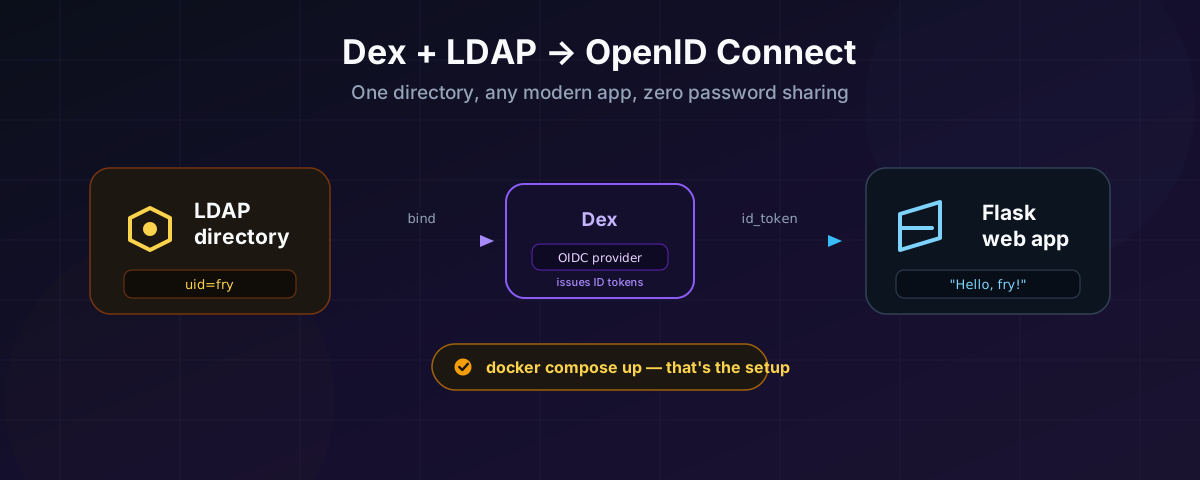
Every company past a certain size has the same directory problem. There is one real source of truth for “who works here and what’s their password” — usually LDAP or Active Directory — and then there is every application built since 2015, none of which wants to speak LDAP. Modern frameworks, modern client libraries, and modern security reviewers all want OpenID Connect: a redirect, a token, a signed set of claims.
Dex is the piece that sits between those two worlds. It’s an OIDC provider that doesn’t own any users itself — it delegates authentication to a connector, and one of the connectors it ships with talks directly to LDAP. Point Dex at your directory, register your app as an OIDC client, and every app you write from that point on authenticates the exact same way — regardless of whether the identity behind it lives in LDAP, Active Directory, GitHub, Google, or SAML. Swap the connector later and the app doesn’t change a line of code.
This post covers all of it, and everything in it is tested against real running containers, not just documentation: Dex + a real LDAP server via Docker Compose, the exact connector configuration to wire them together, what to change in that configuration to point at a real corporate directory instead, and a small Flask app that logs a user in and prints their LDAP uid back at them.
Three things worth fixing in your head before the config starts flying:
- The LDAP bind DN and password never leave your infrastructure. They live in Dex’s config, not in the app, not in the browser.
- Dex binds twice. Once as a read-only service account to find the user’s directory entry, and a second time as that user’s own DN with the password they just typed, to actually check it. That second bind succeeding is the authentication.
- The app speaks one protocol forever. However many identity sources you plug into Dex over the years, the Flask app in this post never changes — it only ever talks OIDC to Dex.
1. Running Dex against LDAP with Docker Compose
For the directory, I’m using rroemhild/docker-test-openldap — a disposable OpenLDAP server pre-loaded with a small cast of test users (it uses the Planet Express crew from Futurama as sample data), so there’s no LDIF to write and no schema to design before you can see a real login work. Section 5 covers exactly what to change to point this at your actual corporate LDAP or Active Directory.
# docker-compose.yml
services:
  openldap:
    image: ghcr.io/rroemhild/docker-test-openldap:master
    container_name: openldap
    ports:
      - "10389:10389"   # LDAP
      - "10636:10636"   # LDAPS
    restart: unless-stopped

  dex:
    image: ghcr.io/dexidp/dex:v2.45.1
    container_name: dex
    depends_on:
      - openldap
    ports:
      - "5556:5556"
    volumes:
      - ./dex-config.yaml:/etc/dex/config.yaml:ro
    command: ["dex", "serve", "/etc/dex/config.yaml"]
    restart: unless-stopped
Two things about that file that aren’t obvious until you hit them:
- Dex’s own image expects its config at
/etc/dex/config.docker.yamlby default. The upstreamDockerfile’sCMDisdex serve /etc/dex/config.docker.yaml. I mount the config to a plainer path and overridecommandexplicitly so there’s no ambiguity about which file is actually loaded. - The test LDAP image listens on 10389, not the standard 389, both inside and outside the container — that’s baked into its
Dockerfile(EXPOSE 10389 10636), not a Compose quirk. Keep that in mind if you swap in a different LDAP image that uses the standard ports.
Now the file that actually does the work — dex-config.yaml, sitting next to the compose file:
# dex-config.yaml
issuer: http://localhost:5556/dex

storage:
  type: memory

web:
  http: 0.0.0.0:5556

connectors:
- type: ldap
  id: ldap
  name: Planet Express LDAP
  config:
    host: openldap:10389
    insecureNoSSL: true

    # A read-only account Dex uses only to *search* for the user's DN.
    bindDN: cn=admin,dc=planetexpress,dc=com
    bindPW: GoodNewsEveryone

    usernamePrompt: "Email or Username"

    userSearch:
      baseDN: ou=people,dc=planetexpress,dc=com
      filter: "(objectClass=inetOrgPerson)"
      username: uid
      idAttr: uid
      emailAttr: mail
      nameAttr: cn
      preferredUsernameAttr: uid

    groupSearch:
      baseDN: ou=people,dc=planetexpress,dc=com
      filter: "(objectClass=Group)"
      userMatchers:
      - userAttr: DN
        groupAttr: member
      nameAttr: cn

staticClients:
- id: flask-demo
  name: "Flask Hello App"
  secret: flask-demo-secret
  redirectURIs:
  - "http://localhost:5000/callback"
Bring it up:
docker compose up -d
Confirm Dex is alive and has picked up the connector:
curl -s http://localhost:5556/dex/.well-known/openid-configuration | jq .issuer
# "http://localhost:5556/dex"

docker compose logs dex | grep connector
# level=INFO msg="config connector" connector_id=ldap
storage: memory is deliberate for this walkthrough — nothing about the LDAP connector needs a database, and it means there’s no SQLite file permissions to fight with. For a Dex you intend to keep running, switch to sqlite3, postgres, or etcd (all documented in Dex’s config.yaml.dist) so staticClients added later via the gRPC API and refresh tokens survive a restart. Static, file-defined clients and connectors — the only kind this post uses — are read fresh from the YAML every time regardless of storage backend.
2. How the pieces actually fit together
Walk through what each numbered step is really doing:
① – ③ Kick off. Your app redirects the browser to Dex’s /dex/auth endpoint with the usual OAuth 2.0 authorization-code parameters. Because this Dex has exactly one connector configured, it skips the “choose your identity provider” screen and renders the LDAP connector’s login form directly.
④ – ⑦ The two binds. The user types their LDAP username and password into a form served by Dex, not by your app. Dex’s LDAP connector then does exactly what any LDAP client would:
- Binds as
bindDN(the service account) and searchesuserSearch.baseDNfor an entry matchinguserSearch.filterwhereuserSearch.usernameequals what was typed. - Takes the DN of whatever it found, and re-binds to the LDAP server as that DN, using the password the user just submitted.
If bind #2 succeeds, the user is who they say they are. That’s the entire authentication — Dex holds no password hash of its own for LDAP users, checks nothing itself, and simply asks the directory the same question it would ask for any other client.
⑧ – ⑩ Consent and the redirect back. The first time a given user authorizes a given client, Dex shows a one-time “Grant Access” screen listing the scopes requested (profile, email, groups). Approve it, and Dex 302s the browser back to your app’s redirect URI with a short-lived, single-use authorization code.
⑪ – ⑫ The code exchange. This step never touches the browser. Your app’s backend calls Dex’s /dex/token endpoint directly, authenticating as itself with client_id + client_secret, and trades the code for an id_token and access_token.
⑬ Render. The ID token is a signed JWT. Your OIDC client library verifies its signature against Dex’s published keys and hands you a plain dictionary of claims — preferred_username, email, groups, whatever scopes you asked for. That’s where "fry" comes from.
Nowhere in that sequence does your application process see a password, and nowhere does the browser talk to LDAP. That separation is the entire point of putting Dex in the middle.
3. What Dex actually needs from your directory
The connectors[].config block above is the part worth understanding field by field, because it’s what you’ll actually be editing when you point this at something real.
| Field | What it’s for | Value used above |
|---|---|---|
host | LDAP server address, host:port | openldap:10389 |
insecureNoSSL | Allow a plaintext connection | true (demo only — see §6) |
bindDN / bindPW | The read-only service account used to search for users | cn=admin,dc=planetexpress,dc=com |
usernamePrompt | Label on Dex’s login form | "Email or Username" |
userSearch.baseDN | Where under the tree to look for people | ou=people,dc=planetexpress,dc=com |
userSearch.filter | Extra LDAP filter narrowing the search | (objectClass=inetOrgPerson) |
userSearch.username | Attribute compared against what the user typed | uid |
userSearch.idAttr | Attribute (or literal DN) used as the stable internal ID | uid |
userSearch.emailAttr | Attribute mapped to the OIDC email claim | mail |
userSearch.nameAttr | Attribute mapped to the OIDC name claim | cn |
userSearch.preferredUsernameAttr | Attribute mapped to preferred_username | uid |
groupSearch.baseDN / .filter | Where to look for group objects | ou=people,…, (objectClass=Group) |
groupSearch.userMatchers | How a user’s DN maps onto a group’s member list | userAttr: DN, groupAttr: member |
preferredUsernameAttr is the field doing the most work for this specific use case — it’s what puts the bare LDAP uid (fry, not a DN, not an email) into the token as preferred_username, which is exactly what the Flask app below prints.
Two things Google’s and every other vendor’s docs will tell you if you keep going down this road, worth internalizing now: map any attribute before you reference it — you can’t use a claim in userSearch or groupSearch that isn’t named there — and an unset groupSearch block is fine; groups are additive, not required for basic login to work.
4. The Flask app
This is deliberately small: log in, read one claim, print it.
dex-demo/
├── app.py
├── requirements.txt
# requirements.txt
Flask==3.1.3
Authlib==1.7.2
requests==2.32.3
That requests line matters more than it looks — Authlib’s Flask integration imports it eagerly even though pip install Authlib alone doesn’t always pull it in as a hard dependency. Leave it out and the app fails at import time with ModuleNotFoundError: No module named 'requests', not at request time, which makes it a confusing first error to hit.
# app.py
import os

from authlib.integrations.flask_client import OAuth
from flask import Flask, redirect, session, url_for

app = Flask(__name__)
app.secret_key = os.environ.get("FLASK_SECRET_KEY", "dev-only-change-me")

oauth = OAuth(app)
oauth.register(
    name="dex",
    server_metadata_url="http://localhost:5556/dex/.well-known/openid-configuration",
    client_id="flask-demo",
    client_secret="flask-demo-secret",
    client_kwargs={"scope": "openid profile email groups"},
)


@app.route("/")
def index():
    user = session.get("user")
    if not user:
        return '<p>Not logged in.</p><a href="/login">Log in with Dex</a>'
    return (
        f"<h1>Hello, {user['preferred_username']}!</h1>"
        f"<p>Email: {user.get('email')}</p>"
        f"<p>Groups: {', '.join(user.get('groups', [])) or '(none)'}</p>"
        f'<a href="/logout">Log out</a>'
    )


@app.route("/login")
def login():
    redirect_uri = url_for("callback", _external=True)
    return oauth.dex.authorize_redirect(redirect_uri)


@app.route("/callback")
def callback():
    token = oauth.dex.authorize_access_token()
    session["user"] = token["userinfo"]
    return redirect(url_for("index"))


@app.route("/logout")
def logout():
    session.pop("user", None)
    return redirect(url_for("index"))


if __name__ == "__main__":
    app.run(host="localhost", port=int(os.environ.get("PORT", 5000)), debug=True)
Walking through the parts that matter:
server_metadata_urlis the only endpoint you have to hand-configure. Authlib fetches Dex’s discovery document from it and learns every other endpoint (/dex/auth,/dex/token,/dex/keys) on its own — this is the entire point of OIDC discovery.client_kwargs={"scope": "openid profile email groups"}determines which claims come back. Dropprofileandpreferred_usernamedisappears from the token; dropgroupsand so does the group list.openidis non-negotiable — without it you get a bare OAuth 2.0 token, no ID token at all.oauth.dex.authorize_redirect(redirect_uri)builds the entire/dex/auth?...URL — client ID, scope, state, and PKCE challenge — and sends the browser there. You never construct that URL by hand.token = oauth.dex.authorize_access_token()is doing steps ⑪ and ⑫ from the diagram in one call: it exchanges the code, fetches Dex’s signing keys, verifies the ID token’s signature, and returns the decoded claims astoken["userinfo"].session["user"] = token["userinfo"]is deliberately the only thing this demo persists. In anything beyond a demo, treat this as a starting point for your own session/user model, not the final design.
Install and run it:
pip install -r requirements.txt
python app.py
Open http://localhost:5000 and log in as any of the test directory’s users — fry, leela, bender, hermes, professor, zoidberg, or amy — using the username as the password too (fry / fry). You’ll land on Dex’s login page, not Flask’s; that’s correct, and it’s the whole design. After granting access once, you’re bounced back to:
Hello, fry!
Email: fry@planetexpress.com
Groups: ship_crew
That’s a real LDAP bind, through a real OIDC exchange, printing a claim that traces straight back to a uid attribute in the directory.
Browse to
localhost, not127.0.0.1. The redirect URI registered with Dex ishttp://localhost:5000/callbackexactly. Flask’surl_for(..., _external=True)builds that URL from the host header of the incoming request, so if you open the app via127.0.0.1:5000instead, the generated redirect URI won’t match what’s registered and Dex will reject it. Pick one hostname and use it everywhere — browser,redirectURIs, andserver_metadata_urlalike.
5. Pointing this at a real LDAP or Active Directory
Everything above uses a disposable test directory so the whole chain works from a clean checkout with zero setup. Swapping in your real infrastructure only ever touches the connectors[].config block — nothing in the Flask app changes, because it never talks to LDAP at all.
| Setting | Test directory (this post) | Typical real OpenLDAP | Typical Active Directory |
|---|---|---|---|
host | openldap:10389 | ldap.yourco.internal:636 | dc01.yourco.internal:636 |
insecureNoSSL | true | false | false |
| TLS | none | rootCAData with your CA, or startTLS: true on 389 | same |
bindDN | cn=admin,dc=planetexpress,dc=com | a dedicated read-only service account, never cn=admin | a service account with just “read” AD rights |
userSearch.baseDN | ou=people,dc=planetexpress,dc=com | your people OU | your Users OU or a narrower sub-OU |
userSearch.filter | (objectClass=inetOrgPerson) | (objectClass=inetOrgPerson) | (&(objectClass=person)(!(userAccountControl:1.2.840.113556.1.4.803:=2))) — excludes disabled accounts |
userSearch.username / idAttr | uid | uid | sAMAccountName |
groupSearch.filter | (objectClass=Group) | (objectClass=groupOfNames) | (objectClass=group) |
A production-shaped LDAPS block looks like this:
host: ldap.yourco.internal:636
insecureNoSSL: false
insecureSkipVerify: false
rootCAData: "<base64 of your CA cert>"
Get that value with:
base64 -w 0 your-ca.crt
Never run insecureNoSSL: true or insecureSkipVerify: true against a directory holding real credentials — that combination sends every user’s password to your LDAP server in clear text, and skips validating that the server on the other end is actually the one you think it is.
The Dex LDAP connector reference documents every field, including Kerberos/SPNEGO single sign-on if you want to skip the login form entirely for domain-joined machines.
6. Hardening before this goes anywhere real
- Never bind as a domain admin or
cn=admin. Create a dedicated service account forbindDNwith read-only rights, scoped to the OU it needs to search. - Turn on TLS.
insecureNoSSL: trueandinsecureSkipVerify: trueexist for exactly the disposable-test-container situation in this post. Treat them as demo flags, not defaults. - Rotate
staticClients[].secretper environment, and don’t commit real ones to git — theflask-demo-secretabove is deliberately obvious. - Use
sqlite3/postgresstorage, notmemory, for any Dex you expect to survive a restart with refresh tokens intact. - Put Dex behind HTTPS in anything beyond localhost — the
issuervalue is part of what gets checked when a client validates a token, andhttp://issuers are a footgun the moment this leaves your laptop. - Scope
groupSearchnarrowly. A wide-open group search leaks group membership of your whole directory into every client that asks for thegroupsscope.
Wrapping up
The value of Dex here isn’t really “LDAP now has a web login” — LDAP already had one. It’s that the app stops caring where identity comes from. The Flask app in this post is thirty lines, doesn’t import an LDAP library, and would work completely unchanged if you deleted the ldap connector tomorrow and replaced it with google, github, or saml. That’s the trade Dex is making: a small broker in the middle, in exchange for every application behind it speaking one protocol, forever.
Everything in this post — the compose file, the connector config, the Flask app — is exactly what I ran to verify it, against a real LDAP bind, not just documentation.
Questions or corrections, reach me at vijay@mevijay.com or on GitHub.
References
- Dex — project site and docs
- Dex LDAP connector reference
- dexidp/dex — source,
examples/ldap/,config.yaml.dist - rroemhild/docker-test-openldap — the disposable test directory used in this post
- Authlib Flask OAuth client